
Summary
The goal of this page is to provide understanding on how a BENOCS Analytics deployment is secured in a customer-hosted deployment. Further, it is aimed to answer questions raised by the security teams of BENOCS Analytics customers.
Terms Used on This Page
The “deployment” is the set of virtual machines and underlying hardware (or portion of) that supports and runs the BENOCS Analytics product.
The terms “virtual machine”, “VM”, “server” and “node” are used interchangeably on this page when referring to the machines that are used in the BENOCS Analytics deployment.
A “flow” represents the connectivity from one location in a network to the other. Firewall rules may need to be configured on specific devices to enable a particular flow.
Deployment VMs Overview
In a customer-hosted deployment there are multiple virtual machines deployed.
Standard deployment VMs table:
Connectivity Overview
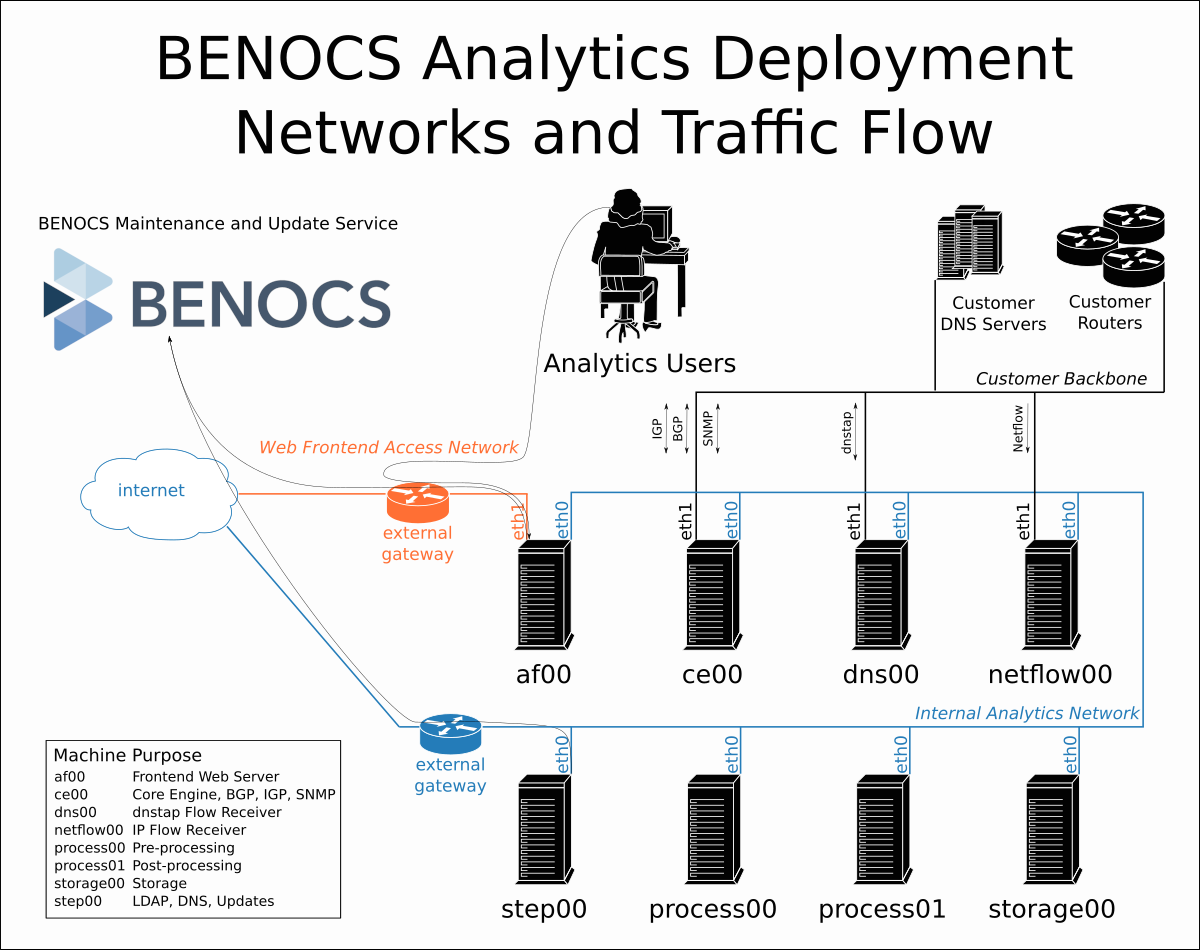
BENOCS Analytics Networks:
| Network | Size | Description |
| Internal Analytics | /28 | VM-to-VM communication |
| Customer Backbone | /29 | BENOCS Analytics to customer infrastructure |
| Web Frontend Acess | /30 | Customer access to BENOCS Analytics application |
Each VM has an internal interface connected to the Internal Analytics Network. The step00 VM on this network needs outbound connectivity as per the firewall rules.
The ce00, netflow00 and dns00 VMs connect to, or receive data from the customer’s internal network. These VMs have an additional interface connected to the Customer Backbone Network. VMs on this network need connectivity as per the firewall rules.
The af00 VM has an external interface connected to the Web Frontend Access Network. The af00 has public connectivity, is logically separated from the other VMs, and needs its own outbound connectivity as per the firewall rules.
Firewall Rules
The firewall rules are divided into four sections. Three sections covers the connectivity for each of the three networks. The last section is temporary rules required for initial access and installation. These are only necessary for the initial setup.
Column Description:
- FlowNo, FlowName: Each firewall rule is numbered and associated with a particular flow to aid reference.
- Src. Entity, Dest. Entity: Describe the VM name, the customer or BENOCS infrastructure
- Src. IP, Dest. IP: These are “TBA” where the information is dynamic for a specific customer
- Src. Port, Dest. Port: Provided for TCP or UDP-based flows
- Type: Identifies the type of flow. eg: TCP, UDP
- Protocol: Describe the specific protocol transmitted
- Encryption/Notes: Additional security context for the flow
Customer Backbone
| FlowNo | FlowName | Src. Entity | Src. IP | Src. Port | Dest. Entity | Dest. IP | Port | Type | Protocol | Encryption/Notes |
| 1 | Netflow | Routers or Flow Distributor | TBA | Any | netflow00 | TBA | 2055 | UDP | cflowd | Unencrypted protocol. Port is defined by customer. |
| 2 | BGP out | ce00 | TBA | Any | Routers | TBA | 179 | TCP | BGP | BGP is an unencrypted protocol. We support TCPMD5 for message validation. |
| 3 | BGP in | Routers | TBA | Any | ce00 | TBA | 179 | TCP | BGP | BGP is an unencrypted protocol. We support TCPMD5 for message validation. |
| 4 | SNMP | ce00 | TBA | Any | Routers | TBA | 161 | UDP | SNMP | We support both SNMP v2c (unencrypted) and SNMP v3 (which can be encrypted). |
| 5 | dnstap | DNS Servers | TBA | Any | dns00 | TBA | 5453 | TCP | dnstap | Unencrypted |
Web Frontend Access
| FlowNo | FlowName | Src. Entity | Src. IP | Src. Port | Dest. Entity | Dest. IP | Port | Type | Protocol | Encryption/Notes |
| 6 | Webapp user access | Any | Any | Any | af00 | TBA | 80, 443 | TCP | HTTPS | HTTP requests are redirected to HTTPS. HTTPS is served via TLSv1.3 or TLSv1.2. For user access and LetsEncrypt certificate validation. |
| 7 | Webapp www | af00 | TBA | Any | Any | Any | 80, 443 | TCP | HTTP, HTTPS | OS Updates. |
| 8a | Webapp www | af00 | TBA | Any | Any | Any | 53 | TCP, UDP | DNS | Unencrypted protocol |
| 8b | Webapp www | af00 | TBA | Any | Any | Any | 123 | UDP | NTP | Unencrypted protocol |
| 9 | Webapp mails | af00 | TBA | Any | BENOCS | 91.102.13.131 | 587 | TCP | SMTP | Mails transmitted to our server always use STARTTLS (Encrypted) |
| 10 | Webapp maintenance | af00 | TBA | Any | BENOCS | 91.102.13.135 | 22 | TCP | SSH | Encrypted. Key-based authentication. Git and repository access. |
| 11 | Webapp maintenance | af00 | TBA | Any | BENOCS | 91.102.13.136 | 6514 | TCP | rsyslog | Encrypted. GnuTLS. TLS 1.2 with certificates for validation. |
| 12 | Webapp maintenance | af00 | TBA | Any | BENOCS | 91.102.13.136 | 8080 | TCP | HTTPS | Encrypted. Remote monitoring. |
| 13b | Webapp VPN | af00 | TBA | Any | BENOCS | 5.183.42.64 | 8443 | TCP | OpenVPN | Encrypted with AES-256 + RSA. Administrative access. |
| 13c | Webapp VPN | af00 | TBA | Any | BENOCS | 5.183.42.17 | 51824 | TCP | Wireguard | Future migration. |
Internal Analytics
| FlowNo | FlowName | Src. Entity | Src. IP | Src. Port | Dest. Entity | Dest. IP | Port | Type | Protocol | Encryption/Notes |
| 14 | VM-LAN | Internal Analytics Network | N/A | Layer 2 | Internal Analytics Network | N/A | Layer 2 | Layer 2 | Internal communication | |
| 15c | Backend maintenance VPN | step00 | TBA | Any | BENOCS | 5.183.42.64 | 8444 | TCP | OpenVPN | Encrypted with AES-256 + RSA. Administrative access. |
| 15d | Backend maintenance VPN | step00 | TBA | Any | BENOCS | 5.183.42.64 | 8443 | TCP | OpenVPN | Encrypted with AES-256 + RSA. Analytics Updates, Monitoring, Logs |
| 15e | Backend maintenance VPN | step00 | TBA | Any | BENOCS | 5.183.42.17 | 51823 | UDP | Wireguard | Future migration. |
| 15f | Backend maintenance VPN | step00 | TBA | Any | BENOCS | 5.183.42.17 | 51824 | UDP | Wireguard | Future migration. |
Installation Access
| FlowNo | FlowName | Src. Entity | Src. IP | Src. Port | Dest. Entity | Dest. IP | Port | Type | Protocol | Encryption/Notes |
| 17 | temporary www | step00 | TBA | Any | Any | Any | 80, 443 | TCP | HTTP, HTTPS | OS Updates |
| 18a | temporary www | step00 | TBA | Any | Any | Any | 53 | UDP | DNS | DNS for OS Updates |
| 18b | temporary www | step00 | TBA | Any | Any | Any | 123 | UDP | NTP | NTP time sync |
| 19 | temporary ssh | BENOCS | 91.102.13.128/28 | Any | af00 | TBA | 22 | TCP | SSH | SSH initial access to configure deployment. |
| 20 | temporary ssh | BENOCS | 91.102.13.128/28 | Any | step00 | TBA | 22 | TCP | SSH | SSH initial access to configure deployment. |
Outbound Connections
BENOCS Analytics is provided as a Software-as-a-Service (SaaS) offering. BENOCS is responsible for monitoring, maintenance and updates. To enable us to perform these tasks, we establish connectivity from the deployment back to our infrastructure. This connectivity is established for:
- ongoing monitoring and alerting (eg: disk space, RAM, process monitoring, …)
- updates for operating system, software and our product
- access for support and maintenance users
Inbound Connections
The af00 node has inbound web access. This is for web users to access the interface, and also for the automated deployment of TLS certificates via LetsEncrypt.
Separation of Concerns for WebApp
We logically separate the frontend from the backend. The webapp is run on af00 (frontend) and is kept logically separated from the other servers (backend). We implement this separation at multiple levels.
- Isolated Internet Connectivity: The logging, monitoring and administrative access for the frontend are all routed over a separate internet connection, removing any need to route or connect via the backend. The frontend has its own backhook for administrative access via this link.
- One-way backend-to-frontend connectivity: WebApp data is push-to-frontend only. The WebApp cannot log in to the backend servers or services.
- Limited user access: A smaller number of our users access are configured to access the frontend, further limiting exposure.
Initial Setup Access
BENOCS require initial access to the VMs to kickstart the setup. Our preferred method here is direct SSH access. Once the setup is completed, these inbound connectivity points can be removed. The SSH access should be limited as per the Installation Access firewall rules. If SSH cannot be provided, a manner of direct console access must be arranged to complete the initial setup.
Operating System and OS Updates
For on-premise customer hosting, BENOCS provide the initial installation media as ISOs. The ISOs are built from and utilize a current Ubuntu LTS operating system. Our update cadence of LTS releases is in line with Ubuntu’s 5 year support window. Operating System software updates are configured to be applied automatically.
For a deeper dive into how the software is maintained by Ubuntu, please refer to our PDF here: 20220819 – On Ubuntus Security and also reference: Canonical.NCSC.Cloud.Security.Principles.Assessment.24.06.22.1
Security Controls
Access to the deployment is restricted to a subset of BENOCS employees. To access the deployment, BENOCS employees require access to a VPN, then to a jump host, and only from there can connect to the step node of the deployment. The VPN is certificate-based, and each SSH jump requires a separate SSH key-pair which are additionally secured with passwords.
Data Protection
All customer traffic data is received, processed and remains on the deployment VMs.
Security FAQ
Does the customer have to manage logins to the VMs?
Customer login to the operating system of the machines is not required.
Can BENOCS install and configure the anti-virus/firewall/monitoring/alerting tool from our IT security team?
Absolutely. Please make the .deb package available and provide detailed install and configuration steps and network requirements.
Our security department require a copy of your system logs to be sent to our central log server.
This can be arranged. Please reach out to us with details of your rsyslog receiver ahead of deployment.
Can BENOCS provide images for a specific type or hypervisor platform? eg: .ovf, .vmdk, .qcow2, VMware, OpenStack, ...
To maintain as wide a compatibility offering as possible, we offer our install medium as ISOs. If your system doesn’t allow this, please discuss this with our implementation team.
Can a customer disable BENOCS' access to the deployment?
The software is offered as “Software as a Service” (SaaS). To ensure we are able to manage and monitor the system, we need access into, and the monitoring data from, the system at all times.