
Connectivity overview for BENOCS trials
If a customer chooses to begin with BENOCS trial hosting, the connection method is via IPsec.
IPsec Configuration via VPN
The fastest and easiest connection between the customer’s network and BENOCS’ cloud hosting platform runs over public IP. BENOCS is connected via Deutsche Telekom’s core backbone network AS3320, which provides highest standards in availability and security.
For trials, the IPsec tunnel operates in NAT-T (UDP-encapsulated) mode only.
Please allow UDP 500 and UDP 4500 between your network and the BENOCS endpoints.
Native ESP (non-UDP) is not supported for trials at this time; enabling ESP is under evaluation.
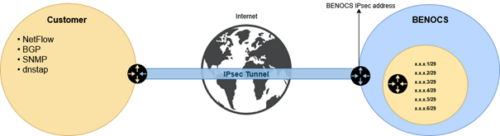
The IPsec connection runs over Public-IP. The customer allocates a /29 IPv4 of his core network ASN, which individual addresses serve as endpoints for the protocol export (BGP, SNMP, flow, dnstap). The following graph sketches the configuration:
Information-gathering protocols
The following protocols on the customer network shall be directed towards the BENOCS Analytics system:
flow protocols (mandatory)
BENOCS Analytics supports all major flow protocols such as sFlow, flow, IPFIX, cflow, jflow, netstream, etc. from all edge routers, i.e. all routers holding an eBGP session or terminating for customers. All flow protocols are to be directed towards the NetFlow00. The recommended sampling rates are between 1:100 and 1:10000 depending on the network throughput. BENOCS will send you a link to the technical questionnaire, in which the customer provides their current default profile.
BGP (mandatory)
Routers exporting flow data establish BGP sessions with the BENOCS Core Engine (ce00) to provide control-plane visibility. The ce00 operates as a read-only peer and does not modify or advertise routes.
SNMP/Telemetry (strongly recommended)
SNMP information is required to display capacity, utilization, cross-validation and the Capacity Planning module. Exported fields: the customer provides their current default profile in the Technical Questionnaire (link will be sent by BENOCS) to be directed and pulled by ce00 node.
DNS (necessary for DNS-based service distinction)
DNS protocol is required to assign service tags to flows (e.g. video, gaming, OS updates, Disney+, Instagram…). Exported fields (cache misses only): Query, A-Record/AAAA, CNAME, timestamp & TTL, resolver-IP.
Example protocols
NetFlow, Sflow, IPFIX
BENOCS Analytics uses flow information for a wide variety of tasks. As such, flow information is one of the two mandatory data sources that needs to be supplied. Due to internal data processing, BENOCS Analytics requires traffic to be sampled at the ingress router.
Example Cisco configuration:
| flow exporter-map BENOCS_EXPORTER_MAP
version 9 Interface configuration: flow ipv4 monitor BENOCS_IPv4_MONITOR_MAP sampler BENOCS_SAMPLER_MAP ingress Supported protocols: sFlow, NetFlow, IPFIX |
The Border Gateway Protocol (BGP) is used to track the flows from ingress to egress through the network. To take local decisions into account, BENOCS Analytics must be configured as a route reflector client to any BGP router it is connected to.
We recommend connecting BENOCS Analytics directly to all routers which send flow and which have external (eBGP) connections. Any router without external (eBGP) connections, in this case, can be ignored.
Example Cisco Configuration:
| router bgp xxxx neighbor xxx.xxx.xxx.xxx use neighbor-group BENOCS-NEIGHBOR-GROUP description TO-BENOCS-1 ! neighbor-group BENOCS-NEIGHBOR-GROUP remote-as xxxx # ibgp required password encrypted SOMETHING description BENOCS-LISTENER-ONLY Client to receive full routing table, nothing send update-source Loopback0 address-family ipv4 unicast route-policy BENOCS-Listener-in in route-reflector-client next-hop-self soft-reconfiguration inbound always ! address-family ipv6 unicast update-source Loopback0 route-policy BENOCS-Listener-in in route-reflector-client next-hop-self ! route-policy BENOCS-Listener-in drop end-policy ! |
SNMP/Telemetry
BENOCS Analytics uses SNMP/Telemetry information to:
- Overlay interface bitcount with flow traffic
- Obtain interface name and interface label (e.g. ASN)
- Obtain capacity to calculate utilization
- Display 5-min SNMP over flow data
- Provide billing-grade multi-dimensional traffic data
When SNMP/Telemetry is configured, BENOCS queries the following data fields:
- IfName (interface name)
- IfDesc (interface description)
- IF-Speed (interface speed)
- Output-bytes-5 (outgoing interface byte counter)
- Input bytes-5 (incoming interface byte counter)
- IF-Index (interface index)
- IF-IPv4 (IPv4 address of the interface)
- ConfiguredASN
- ConfiguredASNState
- Hostname
dnstap
BENOCS Analytics uses DNS information to identify services within AS Flows by mapping A-Record/AAAA with IP’s obtained by flow data. The minimal DNS data set required are the cache misses, i.e. the communication between Network’s DNS resolvers and the respective authoritative DNSs. Cache misses don’t hold any subscriber data and therefore are not covered by data protection restrictions. DNS data shall be exported in dnstap protocol as documented in https.//dnstap.info.
Explanation of functions
- AS Flows 4D, 6D & 8D: We show the flow of each flow packet from left to right, with each hop represented as 4, 6 and up to 8 different dimensions (provided all the protocols are made available).
- Core Planner: SNMP-based utilization overview of all links (internal/backbone) for capacity planning purposes. This function also includes customizable thresholds.
- Border Planner: SNMP-based utilization overview of all links (external/peers) for capacity planning purposes.
- Customer Portal: Assigns read-only access to the customer’s customers of the traffic data of their traffic with the customer’s network. View options can be customized per user-group.
- SNMP integration (Data, Graph, Autoscaling): overlay of capacity, bit count-throughput and utilization. Automatically scales flow sampling to real bit count value; overcomes common issues with flow data export drops in high-load situations.
- Core Flow Inspector: Displays Flow Explorer data over individual links on the backbone, even if backbone routers (e.g. LSR’s) don’t export flow. All 6 dimensions are displayed and can be filtered.
- Application Identifier: Identifies services within Flow Explorer data (e.g. video, gaming, OS updates, Disney+, Netflix, Amazon Prime, etc.) based on CNAME/A-record pairing. Centrally edited and customizable tags available.
Sample OIDs queried by router vendors
Cisco
IfDesc = iso.3.6.1.2.1.31.1.1.1.18
IfName = iso.3.6.1.2.1.31.1.1.1.1
output-bytes-5 = iso.3.6.1.2.1.31.1.1.1.10
input-bytes-5 = iso.3.6.1.2.1.31.1.1.1.6
IF-Index = iso.3.6.1.2.1.2.2.1.1
IF-Speed = iso.3.6.1.2.1.31.1.1.1.15
IF-IPv4 = iso.3.6.1.2.1.4.22.1.3
ConfiguredASN = iso.3.6.1.4.1.9.9.187.1.2.5.1.11.1.4
ConfiguredASNState = iso.3.6.1.4.1.9.9.187.1.2.5.1.3.1.4
Hostname = iso.3.6.1.2.1.1.5
IfBundleMap = iso.3.6.1.2.1.31.1.2.1.3
deviceVendor = iso.3.6.1.2.1.1.2
Juniper
IfDesc = iso.3.6.1.2.1.31.1.1.1.18
IfName = iso.3.6.1.2.1.31.1.1.1.1
output-bytes-5 = iso.3.6.1.2.1.31.1.1.1.10
input-bytes-5 = iso.3.6.1.2.1.31.1.1.1.6
IF-Index = iso.3.6.1.2.1.2.2.1.1
IF-Speed = iso.3.6.1.2.1.31.1.1.1.15
IF-IPv4 = iso.3.6.1.2.1.4.22.1.3
ConfiguredASN = iso.3.6.1.2.1.15.3.1.9
Hostname = iso.3.6.1.2.1.1.5
IfBundleMap = iso.3.6.1.2.1.31.1.2.1.3
deviceVendor = iso.3.6.1.2.1.1.2
Huawei
IfDesc = iso.3.6.1.2.1.31.1.1.1.18
IfName = iso.3.6.1.2.1.31.1.1.1.1
output-bytes-5 = iso.3.6.1.2.1.31.1.1.1.10
input-bytes-5 = iso.3.6.1.2.1.31.1.1.1.6
netstreamMap = iso.3.6.1.4.1.2011.5.25.110.1.2.1.2
IF-Speed = iso.3.6.1.2.1.31.1.1.1.15
ConfiguredASNState = iso.3.6.1.2.1.15.3.1.2
bgpPeerLocalAddr = iso.3.6.1.2.1.15.3.1.5
bgpPeerRemoteAS = iso.3.6.1.2.1.15.3.1.9
IPtoIfIndex = iso.3.6.1.2.1.4.34.1.3.1.4
Hostname = iso.3.6.1.2.1.1.5
fullIfBundleMap = iso.3.6.1.2.1.31.1.2.1.3
deviceVendor = iso.3.6.1.2.1.1.2
Arista
IfDesc = iso.3.6.1.2.1.31.1.1.1.18
IfName = iso.3.6.1.2.1.31.1.1.1.1
output-bytes-5 = iso.3.6.1.2.1.31.1.1.1.10
input-bytes-5 = iso.3.6.1.2.1.31.1.1.1.6
IF-Index = iso.3.6.1.2.1.2.2.1.1
IF-Speed = iso.3.6.1.2.1.31.1.1.1.15
IF-IPv4Map = iso.3.6.1.2.1.4.22.1.3
bgpLocalAddrToASN = iso.3.6.1.4.1.30065.4.1.1.2.1.10.1.1.4
deviceVendor = iso.3.6.1.2.1.1.2
Alcatel/Lucent
IfDesc = iso.3.6.1.4.1.6527.3.1.2.3.4.1.34
IfName = iso.3.6.1.4.1.6527.3.1.2.3.4.1.4
output-bytes-5 = iso.3.6.1.4.1.6527.3.1.2.3.74.1.4
input-bytes-5 = iso.3.6.1.4.1.6527.3.1.2.3.54.1.43
IF-Index = iso.3.6.1.4.1.6527.3.1.2.3.4.1.63
IF-SpeedBitPerSec = iso.3.6.1.4.1.6527.3.1.2.3.54.1.103
v4DropBytes = iso.3.6.1.4.1.6527.3.1.2.3.54.1.61
v6DropBytes = iso.3.6.1.4.1.6527.3.1.2.3.54.1.64
v4DropPkts = iso.3.6.1.4.1.6527.3.1.2.3.54.1.58
v6DropPkts = iso.3.6.1.4.1.6527.3.1.2.3.54.1.64
BGPNeighborIPToASN = iso.3.6.1.4.1.6527.3.1.2.14.4.7.1.66.2.1.4
AllIfToIP = iso.3.6.1.4.1.6527.3.1.2.3.6.1.3
AllIfToNetmask = iso.3.6.1.4.1.6527.3.1.2.3.6.1.4
deviceVendor = iso.3.6.1.2.1.1.2